
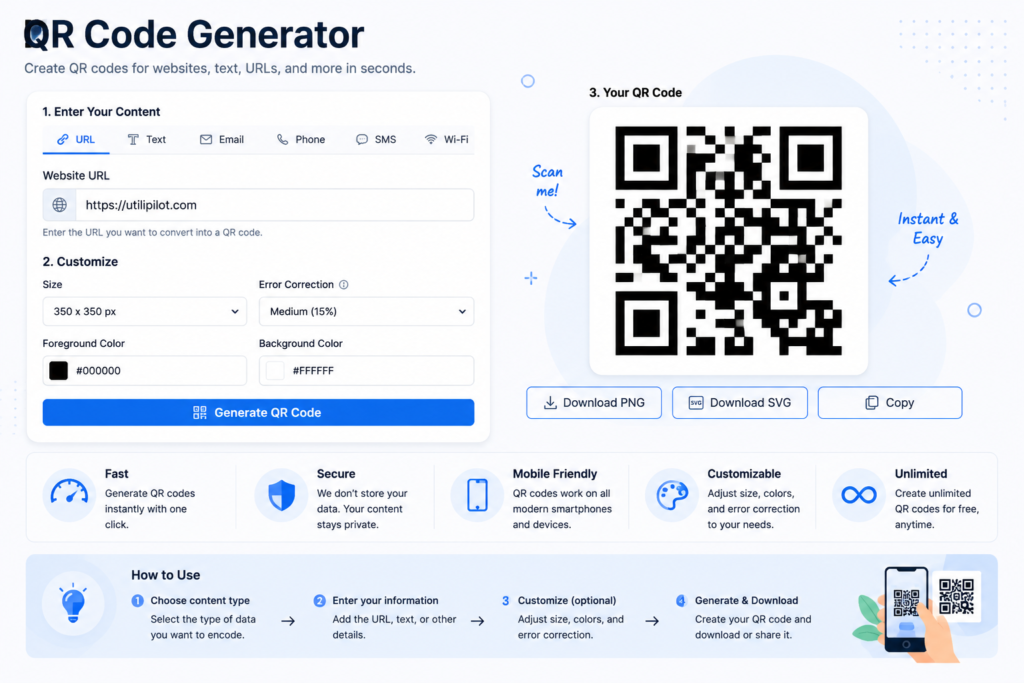
What Is a QR Code Generator?
A QR Code Generator is an online tool that converts text, website URLs, messages, and other information into a scannable QR code. Instead of manually typing a long web address, users can scan the generated code with a compatible smartphone camera or QR reader to access the encoded information quickly.
UtiliPilot’s free QR Code Generator makes it easy to create a QR code directly in your browser. Simply enter the URL or text you want to encode and generate the code instantly. QR codes can be useful for both digital and printed materials, including websites, business cards, posters, menus, product packaging, presentations, and documents.
Common Uses for QR Codes
QR codes provide a convenient way to connect physical or digital content with information that users can access on their phones. Some common uses include:
- Website links: Send users directly to a website, landing page, portfolio, or online resource.
- Printed materials: Add scannable links to flyers, posters, brochures, menus, and business cards.
- Sharing text: Encode short messages or information that can be quickly accessed by scanning.
- Events and presentations: Give attendees an easy way to open supporting resources or web pages.
- Product information: Connect packaging or labels with instructions, specifications, or additional online content.
For the best results, keep the encoded information accurate and test the generated QR code before distributing it. If you are linking to a website, verify that the destination URL works correctly and is mobile-friendly.
How to Use the QR Code Generator
Enter the URL, message or text you want to encode, then click Generate QR Code. Scan the result with a phone before publishing or printing it to confirm that the encoded destination is correct.
Practical Example
Entering https://utilipilot.com creates a QR code that can open the UtiliPilot homepage when scanned by a compatible camera or QR reader.
Factors That Affect the Result
Longer content creates denser patterns. Print size, contrast, image quality, quiet space around the code and physical damage can all influence scanning. For public use, test the final printed or displayed version on multiple devices.
Frequently Asked Questions
Can I encode plain text instead of a URL?
Yes. QR codes can contain plain text as well as web addresses.
Do users need a special scanning app?
Many modern phones can scan QR codes directly with the built-in camera, although device behavior varies.
Should I test the code before printing it?
Yes. Always scan the final version to verify both readability and the encoded content.